
NuMaker-IoT-M263A
Board Introduction | Board Features | Quick Start
Board Introduction
The NuMaker-IoT-M263A developing board, is launched to speed up product design cycle with the IoT software package provided by Nuvoton, connecting the cloud of Arm Pelion, Amazon AWS, and Ali-Cloud is easy to use.
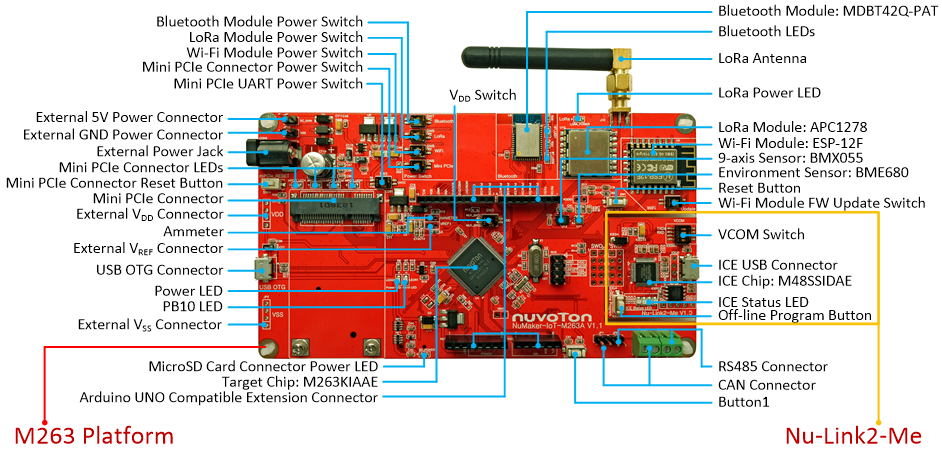
The NuMaker-IoT-M263A consists of two parts, the M263 platform with popular on-board wireless-connectivity/sensor modules, and an on-board Nu-Link2-Me debugger and programmer. The NuMaker-IoT-M263A allows users to quickly develop IoT ( Internet of Things ) related products and easily program and debug application.
The main microcontroller of NuMaker-IoT-M263A is M263KIAAE, with low power and robust security features. The NuMaker-IoT-M263A provides Arduino UNO compatible extension connectors, various power supply option and ammeter connector, makes it is easy to extend functionality and take current consumption measurement
The NuMaker-IoT-M263A provides popular wireless connectivity modules that used in IoT applications, include Wi-Fi, Bluetooth and LoRa modules. The NuMaker-IoT-M263A also supports a mini PCIe connector for inserting external modules to realize 3G/4G/NB-IoT connectivity functions, such as QUECTEL BG96/EC21 modules. Besides, the NuMaker-IoT-M263A integrates BOSCH environmental sensor and 9-axis sensor for acceleration, geo-magnetics, gas, barometric pressure, temperature and humidity sensing. Furthermore, the NuMaker-IoT-M263A supports CAN and RS485 transceiver for industrial control application.
The Nu-Link2-Me is a debugger and programmer that supports on-line programming and debugging through SWD interface. The on-board 16 Mbit SPI Flash allows it to off-line program the target microcontroller. The Nu-Link2-Me provides virtual COM port ( VCOM ) function to print out messages on PC. The Nu-Link2-Me can be separated from NuMaker-IoT-M263A, allowing user to use it as a mass production programming tool.
|
Board Features |
|||||
| • | NuMicro® M263KIAAE used as main microcontroller with function downward compatible with: | ||||
| - | M261ZIAAE | ||||
| - | M261SIAAE | ||||
| - | M261KIAAE | ||||
| - | M262ZIAAE | ||||
| - | M262SIAAE | ||||
| - | M262KIAAE | ||||
| - | M263ZIAAE | ||||
| - | M263SIAAE | ||||
| • | On-board modules: | ||||
| - | Wi-Fi module: ESP12-F | ||||
| - | Bluetooth module: MDBT42Q-PAT | ||||
| - | LoRa module: APC1278 ( for 408 / 433 / 470 MHz ) | ||||
| - | LoRa antenna: ANT60-433LA ( for 433 MHz ) | ||||
| • | On-board sensors: | ||||
| - | Environmental sensor: BME680 | ||||
| - | 9-axis sensor: BMX055 | ||||
| • | Mini PCIe connector ( QUECTEL BG96/EC21 Is available for purchase to extend NB-IOT/3G/4G function ) with SIM card connector | ||||
| • | CAN and RS485 transceiver | ||||
| • | MicroSD card connector | ||||
| • | Arduino UNO compatible extension connectors | ||||
| • | Ammeter connector for measuring the microcontroller’s power consumption | ||||
| • | Fixable board power supply | ||||
| - | External VDD power connector | ||||
| - | Arduino UNO compatible extension connector VIN | ||||
| - | USB OTG connector on M263 platform | ||||
| - | ICE USB connector on Nu-Link2-Me | ||||
| - | Power jack for mini PCIe connector | ||||
| • | On-board Nu-Link2-Me debugger and programmer: | ||||
| - | Debug through SWD interface | ||||
| - | On-line /off-line programming | ||||
| - | Virtual COM port function | ||||
|
Quick Start |
|||||
| 1. | Install the preferred toolchain. Please make sure at least one of the toolchains has been installed. | ||||
| - | KEIL MDK Nuvoton edition M0 / M23 | ||||
| - | IAR EWARM | ||||
| - | NuEclipse (GCC) ( Windows ) | ||||
| - | NuEclipse (GCC) ( Linux ) | ||||
| 2. | Download and install the latest Nuvoton Nu-Link Driver. Please install the Nu-Link USB Driver as well at the end of the installation. | ||||
| - | Download and install Nu-Link_Keil_Driver when using Keil MDK. | ||||
| - | Download and install Nu-Link_IAR_Driver when using IAR EWARM. | ||||
| - | Skip this step when using NuEclipse. | ||||
| 3. | Download and unzip the Board Support Package ( BSP ). | ||||
| 4. | Hardware Setup | ||||
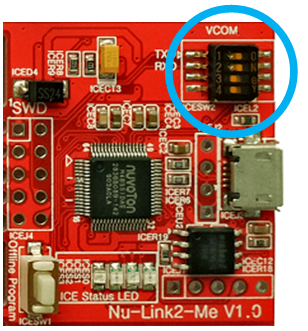
| (1) Open the virtual COM ( VCOM ) function by changing Nu-Link2-Me VCOM Switch No. 1 and 2 to ON. | |||||
|
|
|||||
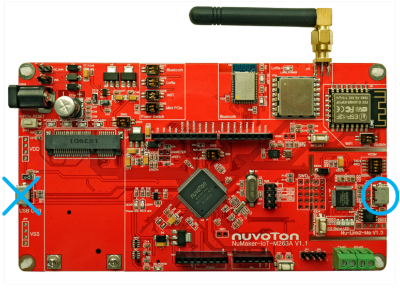
| (2) Connect the ICE USB connector to the PC USB port through USB cable. | |||||
|
|
|||||
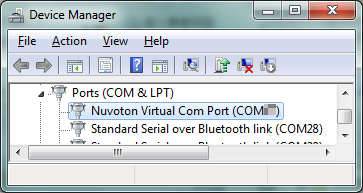
| (3) Find the “Nuvoton Virtual COM Port” at Device Manger. | |||||
|
|
|||||
| 5. | Use the “Template” project as an example. The project can be found under the BSP folder. | ||||
| - | M261_Series_BSP_CMSIS_V3.XX.XXX | ||||
| - | SampleCode | ||||
| - | Template | ||||
| - | GCC | ||||
| - | Keil | ||||
| - | IAR | ||||
| 6. | Open and execute the project under the toolchain. For detail setting, please refer to the NuMaker-M263KI User Manual. | ||||
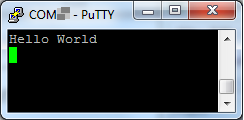
| 7. | User can see the result in the ternimal window on PC. | ||||
|
|
|||||
|
Resources |
|||||
| User Manual | Microcontrollers | Software Development Tool | Driver (BSP) | Programmer | Nuvoton Official Forum | Nuvoton eStore | RF-BG96A | RF-EC21A | |||||