NuStamp-ACK-M031LE
| 1. | Please make sure Keil MDK has been installed. | ||||
| - | KEIL MDK Nuvoton edition M0 | ||||
| 2. | Download and install the latest Nuvoton Nu-Link Driver. Please install the Nu-Link USB Driver as well at the end of the installation. | ||||
| - | Download and install Nu-Link_Keil_Driver when using Keil MDK. | ||||
| 3. | Download and unzip the Board Support Package ( BSP ). | ||||
| 4. | Hardware Setup | ||||
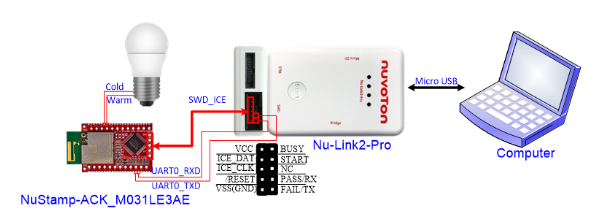
| (1) Connect NuStamp-ACK-M031LE via SWD, and connect PA.4 (P.18) and PA.5 (P.17) to the control signal of LED light. If you need to use Virtual COM, please connect Nu-Link2-Pro UART to UART0 of NuStamp-ACK-M031LE. | |||||
|
|
|||||
| (2) Connect the ICE USB connector to the PC USB port through a Micro USB cable. | |||||
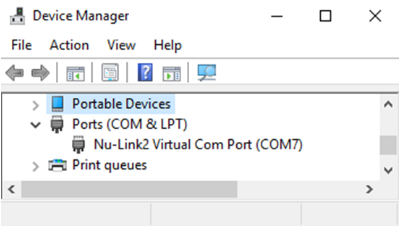
| (3) Find the Nu-Link2 Virtual Com Port at Device Manger. The Nu-Link2-Pro can directly use the virtual serial port (VCOM) function without any settings. Ignore this step if you do not need to use Virtual COM. | |||||
|
|
|||||
| 5. | Use the “NuStamp” project as an example. The project can be found under the BSP folder | ||||
| - | M031_Series_BSP_CMSIS_V3.XX.XXX | ||||
| - | SampleCode | ||||
| - | NuStamp | ||||
| - | Keil | ||||
| 6. | Open and execute the project under the toolchain. For detailed setting, please refer to the NuStamp-ACK-M031LE User Manual. | ||||
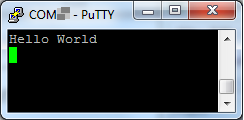
| 7. | User can see the result in the ternimal window on PC. Ignore this step if you do not need to use Virtual COM. | ||||
|
|
|||||
| 8. | Please download and install the Amazon Alexa APP. | ||||
| (1) Make sure that the APP version number is the latest. (>2.2.296128.0.) | |||||
| (2) Make sure that your CID of amazon account is filled into a Whitelist. (Contact Amazon related windows) | |||||
| Note: It is not available in Taiwan, but you can find APK file to install it. | |||||
| 9. | Get started with the Amazon Alexa APP | ||||
| (1) Sign up for an Amazon Alexa account and get the CID (https://developer.amazon.com/settings/console/mycid) |
|||||
| (2) Fill in the CID to the whitelist on the cloud. | |||||
| (3) Open the Amazon Alexa APP and sign in with your Amazon Alexa account | |||||
| (4) Users can see “ACK Module” option under the Development Devices category in the Alexa APP. Then, select the ACK Module option, then complete the new device registration. | |||||
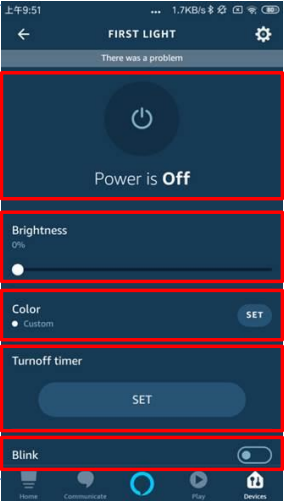
(5) After finishing new device registration, you will get “First light” item in the device list.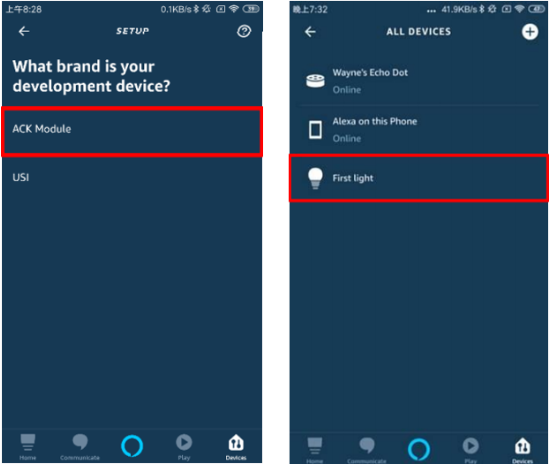 |
|||||
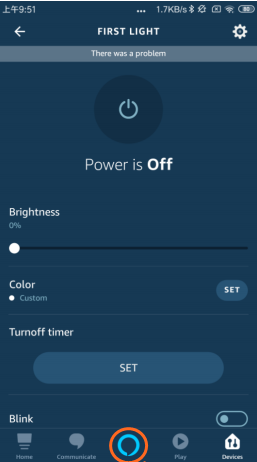
| (6) The light control items are listed below: | |||||
| • | Power controller | ||||
| • | Brightness controller | ||||
| • | Color temperature controller | ||||
| • | Turn-off timer controller | ||||
| • | Toggle controller | ||||
|
|
|||||
| (7) Users can voice control the lights using the built-in program of Amazon Alexa APP or Amazon Echo Dot. Click the Amazon icon at the bottom of the APP window to enter the voice mode. | |||||
| (8) The current light control instructions are listed below: | |||||
| • | Alexa, turn-on First light. | ||||
| • | Alexa, turn-off First light. | ||||
| • | Alexa, set First light to cool. | ||||
| • | Alexa, set First light to warm. | ||||
| • | Alexa, set First light to fifty percent. [1-100%] | ||||
| • | Alexa, set First light to one hundred percent. [1-100%] | ||||
| Note: For more details, please refer to the Amazon website link: | |||||
| https://developer.amazon.com/en-US/docs/alexa/ack/overview.html | |||||
 |
|||||
| (9) Start enjoying your smart life | |||||
|
Resources |
|||||
|
NuStamp-ACK-M031LE User Manual | Microcontrollers | Software Development Tool | Driver (BSP) | Programmer | Nuvoton Official Forum | Nuvoton eStore
|
|||||